
When Prism Tree generates a cover letter or tailored resume, it doesn't just pull from your Career Brain — it also pulls from your Voice Profile. The Voice Profile tells the AI how you write: your tone, your sentence style, how formal or direct you tend to be, and the patterns that make your writing sound like you instead of a generic applicant.
Without a Voice Profile, the AI produces competent, accurate output based on your experience. With one, the output sounds like it could have come from you — which matters more than it sounds when a hiring manager is reading their fifteenth cover letter of the morning.
One important boundary: the Voice Profile applies only to cover letters and tailored resumes. It does not affect the Advise tab's career advisor chat, fit score analysis, interview prep kits, or recruiter messages. Those features pull from your Career Brain, not your writing style.
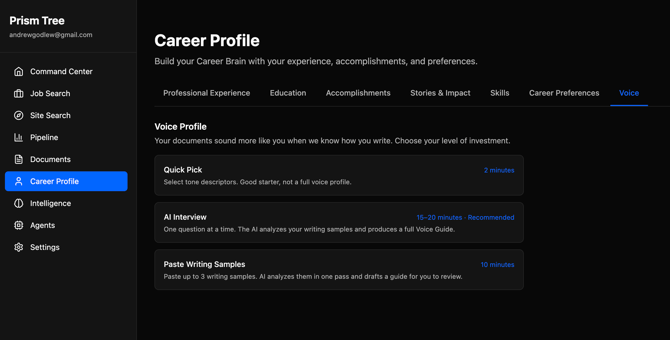
The three setup paths
You'll find Voice Profile setup in the Personalization tab inside Career Profile. There are three ways to build it, and which one is right for you depends on how much time you want to spend and how much precision you want in the output.
Quick Pick
The fastest option. You select a set of tone descriptors from a predefined list — things like "direct," "warm," "formal," "conversational" — and Prism Tree uses those to shape AI output. The whole thing takes about a minute.
Quick Pick is a good starting point if you want to activate voice-aware output immediately and refine later, or if you're not sure yet how to describe your writing style. The output improvement is real but modest compared to the other paths — you're giving the AI a set of adjectives to work with, not actual examples of how you communicate.
AI Interview
A multi-turn conversation where Prism Tree asks you about your communication style, how you like to open a message, what you find off-putting in other people's professional writing, and similar questions. It takes 10 to 15 minutes. At the end, it generates a Voice Guide — a structured document that captures your style in enough detail for the AI to apply it consistently.
This is the best path if you want the highest quality output and have the time to do it properly. The questions are designed to surface preferences you might not think to articulate unprompted, and the resulting Voice Guide is specific enough to make a real difference.
Paste Samples
You paste in examples of your own writing — emails, messages, cover letters you've written before, anything that sounds like you at your professional best. Prism Tree analyzes the samples and generates a Voice Guide from what it observes, rather than from what you describe.
This path works well if you have good examples on hand and would rather show the AI than tell it. It also tends to catch stylistic details that the interview might miss, because it's working from real output rather than self-reported preferences. Two to three samples of a few paragraphs each is usually enough.
What the Voice Guide actually isBoth the AI Interview and Paste Samples paths produce a Voice Guide — a structured document, stored on your account, that describes your writing style in plain language. It covers things like your preferred tone, sentence structure tendencies, how you handle professional formality, and specific things to avoid.
You can read the Voice Guide after it's generated. It's displayed in the Personalization tab and you can edit it inline if anything is off or you want to add something the AI missed. You can also redo the entire setup at any time — the new Voice Guide replaces the old one.
When you generate a cover letter or tailored resume, Prism Tree appends the Voice Guide to the AI's instructions before it writes. The AI treats your style preferences the same way it treats the job description and your career history: as a constraint to work within, not an afterthought.
Which path to chooseIf you're not sure where to start, here's a simple frame:
-
You have five minutes and just want something better than default output: Quick Pick. You can always upgrade later.
-
You're doing active job searching and want the best output Prism Tree can produce: AI Interview. The Voice Guide it generates is the most complete, and the quality difference in cover letters is noticeable.
-
You have a few writing samples you're happy with and prefer not to answer interview questions: Paste Samples. Good writing in, good guide out.
-
You can combine paths — run Quick Pick now to activate something, then come back and do the AI Interview when you have time. The more complete path always takes precedence once saved.
Once a Voice Guide is saved, you can edit it directly in the Personalization tab. Click the edit icon next to any section and make changes inline. This is useful if the generated guide is mostly right but got something specific wrong, or if your style has shifted since you set it up.
If you want to start over entirely, use the Redo option at the top of the Personalization tab. This clears your current Voice Guide and takes you back through the setup flow. Your previous cover letters and resumes are unaffected — only future generation uses the new guide.